
USB-C PD – A Guide To Fast Charging

It always seems that your devices lose a charge at the most unopportune time. And it can feel like forever until they get charged back up again to use. What if there were a better way? Enter: USB-C PD.
I hate to say that USB-C PD is not well known. In fact it is safer to say that not that many people know it exists at all. Or what it is capable of.
What Is USB-C PD?
First of all our regular USB-C port or cable is a 24 pin, reversible connector. They are becoming the industry standard. A typical USB-C port will deliver around 5 volts at a maximum of around 3 Amps. According to Watt’s Law, 5V x 3A = 15 watts.
The PD in USB-C stands for “Power Delivery”. The current PD standard is 3.1 which can supply up to 240 watts for power, or charging. PD 3.1 can supply a theoretical 48 Volts at 5 Amps. (48V x 5A = 240 watts).
That is the good news.
Here’s the bad news: The device to be charged, AND the USB-C cable, AND the charger all have to be able to support USB-C PD and they work in conjunction to speed up charging times.
Additionally, while cranking out that blazing charging speed it promises a 50% charge in 30 minutes. That is pretty quick. After getting that fast charge the battery chemistry starts heating up and the USB-C PD starts slowing down to prevent overheating.
Fast charging is typically designed for a quick top off. Yes, you will get a full charge faster but the goal is to get enough charge quickly to keep your device functioning for a few more hours.
My iPhone 13 (yeah, I know) maxes out at 20 charging watts. In a common USB-A (those are the flat 5 pin connectors that have been around forever) they will only supply 15 watts maximum. Also I have installed some electrical outlets around the house that have a couple of USB-A connectors in them. At best they will supply 15 watts.
A new iPhone 17 can accept up to 40 watts of charge.
What GaN You Do About This?
That’s pretty funny. And you’ll find out why in a second.
GaN stands for Gallium Nitride. This is used instead of silicone in charging devices. It is considerably lighter and handles heat better. The picture in the opening of this blog is a Benfei 20 watt GaN charger ($5.99). I keep one of these in my travel bag.
NOTE: Never, never, never plug your phone into a USB outlet in the airport or at a hotel without a data blocker.
Remember my ancient iPhone 13 maxes out at 20 watts.

Depicted in the photo is the charger for the iPhone 13.
This Apple OEM 20 watt charger for the iPhone 13 costs $19.99.
Remember when I said we have chargers all over the place? The 40 watt brick from Apple for the iPhone 17 costs $39.
This can get expensive fairly quickly.
Never Break The USB-C PD Chain
Stevie Nicks sang that (sorta). She must have known that even if the device supports USB-C PD and the charger supports USB-C PD and you use any old USB cable laying around then the chain will be broken and you’ll be enjoying no speed advantage. In fact the speed may even drop to around 7.5 watts depending on the charger.
What you need to buy is called a “USB-C Fast Charging Cable”. There are a TON of fast charging cables but these are the ones I buy. I’d recommend shopping around. I only buy them when on sale.
Also, you can save money by not overbuying. You don’t need a 240 watt cable if all you are charging is a 40 watt iPhone. And again Apple has given you ONE but you charge your phone all over the place, right? And you’ve never lost or left a cable in a hotel, right?
Power Banks
You see road warriors and influencers about with power banks. Those chargers are their lifeblood. That phone, or camera is vital to what they do.
Here is one of my favorite power banks from Sharge. This is a bit on the heavy size but this USB-C PD device can deliver 140 watts from either USB-C PD port. Heck, your new laptop probably has a max charging speed of 70-100 watts. Again, no need to over-purchase.
USB-C Power Data Object (PDO)
This is a list of power profiles that the charger can support. Here is what I mean by that. This is a list of profiles that the Sharge 170 supports:
USB-C Port 1 (and 2)
- 5V⎓3A
- 9V⎓3A
- 12V⎓3A
- 15V⎓3A
- 20V⎓5A
- 28V⎓5A
Unless the manufacturer gives you this information you have to discover it yourself. There are a couple of great tools that can do this for you. There are other tools but these two are my favorites.
VFLEX
VFLEX Adapters – Their app will poll your device and list the PDO. The app is either browser based (Chrome) or from the IOS App Store or Google Play Store. This data can be saved for each power supply

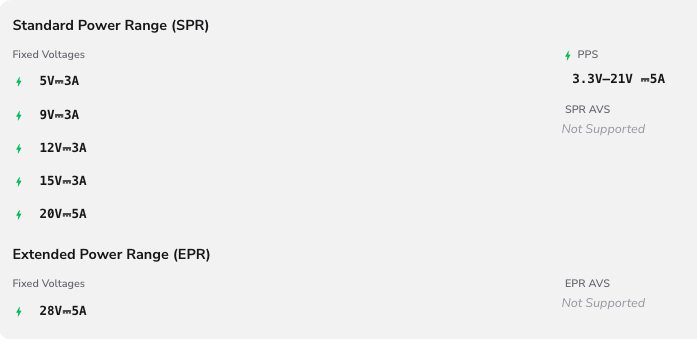
And here is the exact displayed data from the VFLEX app. Note the term EPR at the bottom of the image below. Not all chargers will do EPR. Again, there are only a handful of devices out there that will do this. Also worthy of pointing out is the section labelled PPS or Programmable Power Supply. You can set the voltage manually at any increment between 3.3 to 21 volts. Slick trick.
FNIRSI FNB58 USB Fast Charge Tester
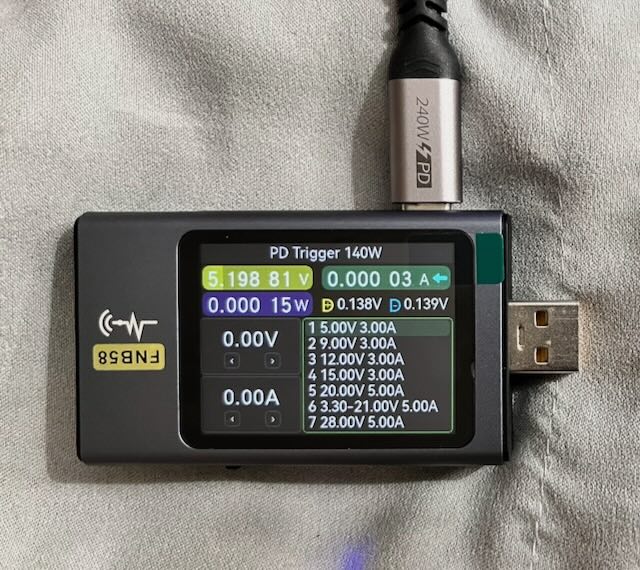
FNIRSI FNB58 – Just listing it. Not showing how it works. Yet. The VFLEX system is way more intuitive to use. FNIRSI also just released the FNB-C2 which is an upgraded USB-C PD 3.1 Tester. As I write this, it isn’t available on Amazon yet.
It shows the exact PDO data as the VFLEX system above.
Which Is Better? VFLEX Or FNIRSI FNB58?
Hands down all day every day and twice on Sunday. VFLEX. While I can toggle through the PD settings and change the output on the FNB58 really my only power delivery solution occurs via USB-C. VFLEX has all manner of adapters and it mocks a bench power supply at a fraction of the cost. VFLEX. You heard it here first.
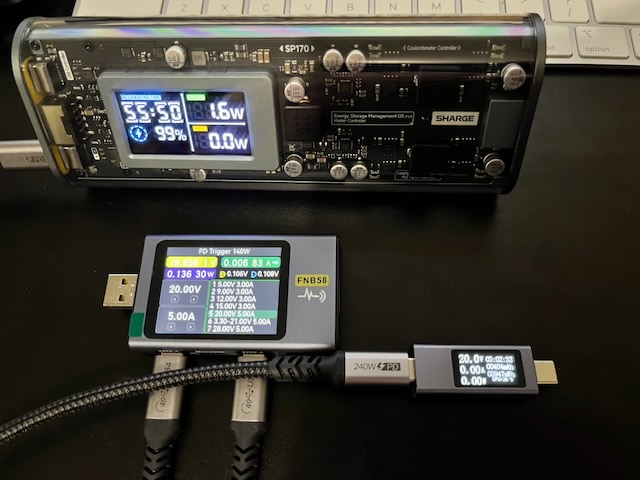
In the pic below the FNB58 can be toggled for higher voltages as demonstrated by the 20 volt output but the business end of that voltage is USB. What are you going to do with that?
What Is Most Important to Know?
If you buy a charger or battery bank make sure it has a USB-C PD port and supports the USB-C PD 3.1 standard. I wouldn’t really want any device that has less than a 100 watt output. Most these days come with 140 watt output. There are only a few devices that support 240 watt charging and I bet you don’t own any of them yet.
AND DON’T FORGET THE CABLE! A lot of these banks and chargers send you a free cable. Look for that.
One final recommendation for a charger. This guy:

AOHI MagCube. Good bang for the buck.
It is a GaN charger and both USB-C ports can supply up to 140 watts if using one port or 65 watts each if using both ports at the same time.
My wife and I both have MacBookAir’s and they max at about 65 watts so this is perfect for us.
Phew!
And now you know a little more about USB-C PD.
Pingback: USB A to USB C Adapter - Compatibility Limits and Best Picks - Auckland Review