
Real Time Kinematic (RTK) Basics
Real Time Kinematic positioning is a way to achieve 1-3 centimeters of accuracy using Global Navigation Satellite Systems (GNSS) or commonly referred to as GPS. GPS is specific to the satellite system established by the United States.
I’ve been dabbling with GNSS modules for a number of years. The accuracy with basic modules is usually around 3 meters which really isn’t bad to start with. However, the GPS you use in your car or phone knows what lane you are driving in. That of course requires a great degree of accuracy.
This blog is intended to be BASIC in nature. I’m not an expert. Yet. But I have learned some quick lessons that I want to pass on to anyone else wanting to dig into RTK.
Here’s a deeper explanation of the advantages of using RTKData networked stations provided by RTKData.com who have been most helpful in my education on this subject.
“RTKdata uses a single-station forwarding approach, meaning your rover receives corrections from one real, physical base station near you, selected automatically from a network of 20,000+ stations worldwide, rather than a synthesized virtual reference point calculated by interpolating between multiple stations.”
I can’t take credit for that statement since RTKData wrote it and provided it to me. That explanation is very concise and lays down the foundation for how networked RTK solutions can be superior to a single base station.
What Can You Achieve With RTK Positioning
Here’s a quick list:
- Surveying
- RC Cars and Airplanes and Boats
- Drones
- Robots
- Robot Lawnmowers
- Agriculture – Automated Field Equipment
- Other things I’m sure I’ve missed
What You Need to Understand
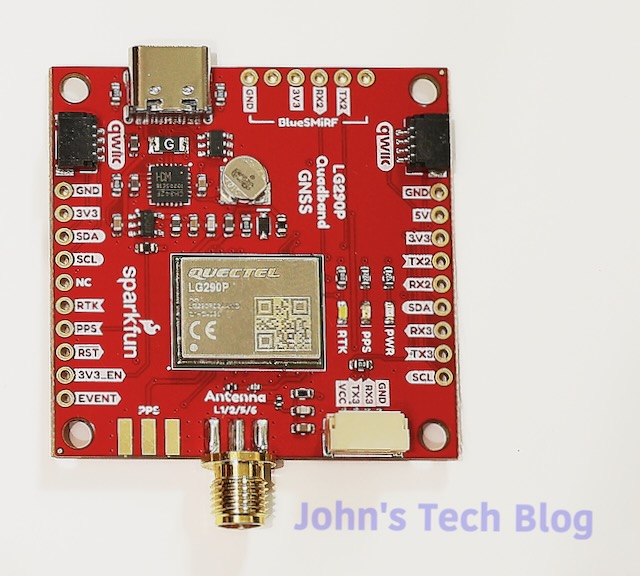
Your typical inexpensive GPS or GNSS module will NOT do RTK. It must be hardware capable to do RTK. Depicted here is the Sparkfun RTK Breakout Board with the Quectel LG290P chipset.
A lot of these RTK capable boards cost around $250-$300 but this board comes in at less than $200 making it an excellent choice to get started.
I was under the assumption that buying an RTK board just organically gave you that 1 centimeter of accuracy. Subsequently, I’m betting other beginning users think that too. That is an incorrect assumption.
Correction Data
To get an RTK fix requires Correction Data to be fed to the chip. This can be achieved a couple of different ways.
- Obtain data from the internet via an NTRIP Caster Service
- Build your own GNSS Base Station
NTRIP
NTRIP stands for Networked Transport of RTCM via Internet Protocol.
RTCM = Radio Technical Commission for Maritime Services
That was the original and current name. Now the phrase is used to describe a data format for providing correction data.
There are free NTRIP casters but unfortunately none are near me. You really want a caster within a few miles of your location. The further away it is, the lesser the accuracy achieved. In North Carolina the government has caster base stations all over and one in my town. The problem here is that to access it requires a one time fee of $500.
There are commercial providers that offer paid NTRIP servers. Typically they cost upwards of $40 or more per month or around $400 per year and up.
Base Station
You can make your own NTRIP Caster by building (or buying) your own base station. Your costs will pretty much include an RTK capable board, a multi-band GNSS antenna, and maybe an outdoor enclosure. The antenna MUST be mounted and not be allowed to move. You collect data for around 12 hours or so and through the magic of software you obtain your EXACT position. Additionally, you can then upload your base station data to a free caster service such as RTK2Go and become part of that peer network.
Economically, in my opinion, this is the route to go. Hardware costs are a one time expenditure. Conversely, you can use that hardware for some other project down the road if you desire.
Given the choice between the government data costs at $500 (one time) or building my own base station I have go with plan B. Additionally, I LEARN SOMETHING as well. That is priceless to me.
This is what I am in the process of doing right now.
Rover
Along with a base station you require a rover. Again the rover could be a robot, a harvester, a drone, or a survey stick.
That means you need two RTK boards and two antennas. Now the cost is going to exceed the one time correction data payment by my NC State Geological government entity. Again, with that I only get access to a server. If I build it and spend slightly more money I own all the hardware and can use it for whatever I want, whenever I want. This week I can survey my property lines. Next week I can control a robot lawnmower. Or I can dabble with drones.
I gain a lot of flexibility vs. pure economy and the cost isn’t that much more expensive.
My Hardware – Proof Of Concept
Testing it all to make sure it works before putting it in an enclosure and permanently mounting the antenna.
RTK Fix Linux
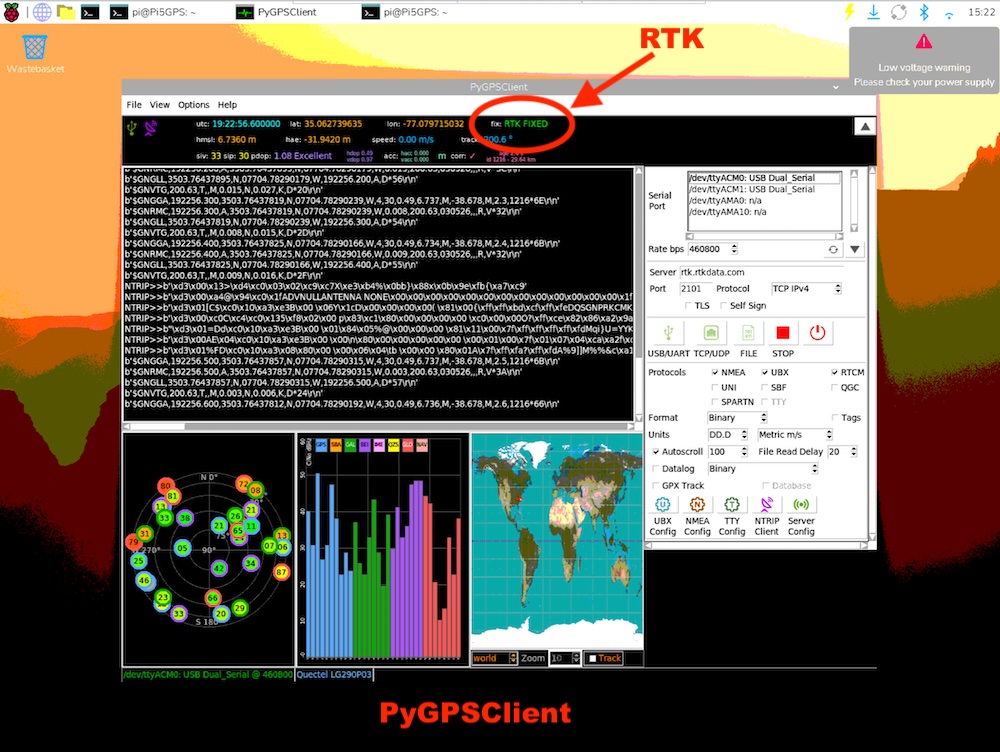
It’s not too difficult to get a fix using Linux. This is on a Raspberry Pi 5 using a program called PyGPSClient
The kicker here is that it must be installed in a Virtual Environment. You can do it like this:
python3 -m venv .venv
source .venv/bin/activate
sudo apt install pygpsclient
pygpsclient
Then fill out your RTK NTRIP Client data (2nd button from right at the bottom of the right hand pane). Subsequently, at the top you can see that it is locked on and says “RTK Fixed”.
RTK Fix Windows – QGNSS
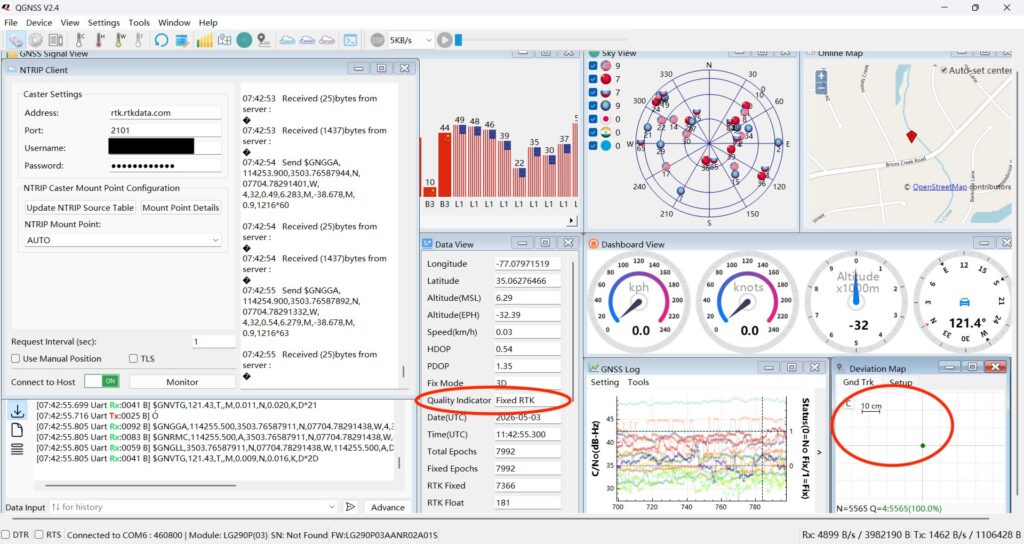
This is a lot easier. Download QGNSS from Quectel and input your RTK caster data and start that stream. The left hand pane shows my login data and mount point from rtkdata.com. Obviously, you have to make an account there.
Again we are showing Fixed RTK and QGNSS has a deviation map that shows me right on the crosshairs on a 10 cm grid.
Wrap Up
Hooking up a GPS module to a computer and getting your latitude and longitude is fun but getting an RTK fix in order to precisely control or measure something makes this a very useful future project. Stay tuned. More on this later.