
Hello Garmin, My Old Friend – Edge 705 Bike Computer
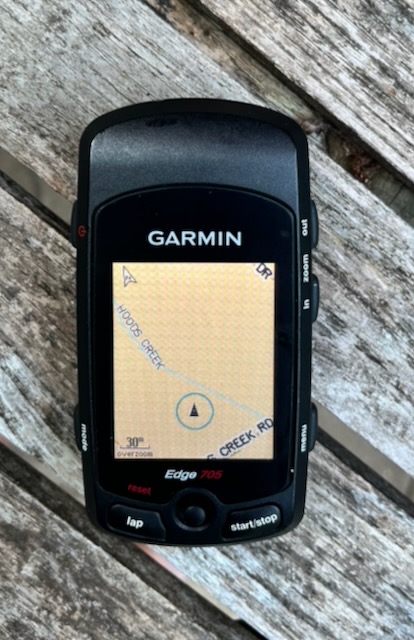
While rooting through my GPS container I stumbled across my old pal, the Garmin Edge 705 Bike Computer.
First released in 2007 it remains a viable bicycle computer and is still frequently popular on the secondary market.
I got mine in March 2009 and bought a Heart Rate Monitor and Cadence Sensor bundle for $479. Yikes!
Mine still looks brand new and still works perfectly……..well, almost perfectly. I found a gotcha.
When I first tried to boot up it was apparent that the battery was dead. The battery is a 3.7 volt Li-Po battery and generally any voltage reading of 3.0 or below means it is a dead duck. Mine was reading 2.4 volts. Quickly, to the Internet, Bike Man.
Battery Replacement
You can still get drop in replacement batteries from Amazon. When I went to order one Amazon told me I bought one in 2020. So it seems like I’ve done this once before. Not using, or charging a Li-Po battery for 6 years will kill it dead.
The battery set me back $25 and this may or may not be economical for everyone. Bike computers don’t cost what they used to. However, this is a Garmin which accepts City Navigator maps. Having said that, Garmin City Navigator Maps are not cheap. A one time map update costs about $50. Now we are talking about a baseline “bring it back to life” cost of $75.
The replacement battery contains all the tools you need to install it. Essentially you remove 6 torx screws and pop the connector end off of the cable that connects to the screen. Plug in battery, plug cable back up. Install the screws. Profit.
Garmin Edge 705 Chipset
This old Edge 705 uses a SiRFstarIII GNSS chipset. These are still viable chips and I own a couple other GPS pucks that use this chipset. One of the best characteristics of this chip was its ability to acquire a satellite GPS signal quickly.
Maps
I booted my Edge 705 and discovered it had a 2021 map set and that it worked fine. I’d have probably kept those maps however, the town I live in is creating all manner of new roads, and traffic circles and removing service roads among other changes.
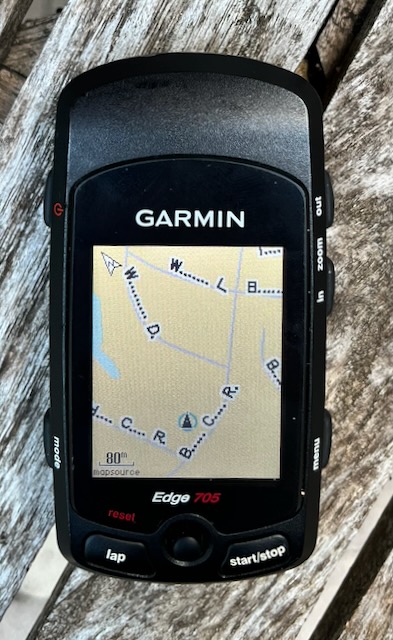
I bought a City Navigator upgrade to the 2027 map set and my fonts were not displaying correctly at all. Illegible. I should add that the capital letters are legible but lower case letters are not.
I went to Google AI and worked through EVERYTHING suggested to no avail. While it seems that I may have wasted money on the map upgrade it all worked out. I have several other devices that map will work on. It isn’t specific to any one device.
I have come to the conclusion that if there is a way to fix this that I can’t find it and finding it has become way too time consuming.
OpenStreetMaps
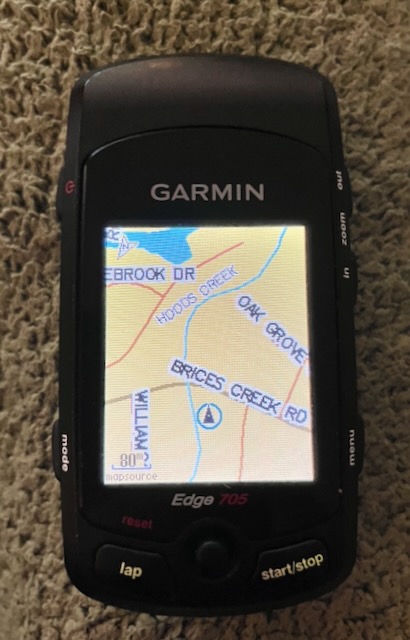
I was able to download some OpenSteetMap tiles from here which are updated WEEKLY.
As you can see there are no such issues with the display of road names or waterway names.
Also after viewing the maps in Garmin Basecamp software I dare say the OpenStreetMap tiles are far better than the City Navigator tiles.
The only real issue with that though is that the entire US Garmin map fits in a 4 GB SD card which is the max size the garmin will recognize.
The OpenStreetMap tiles for JUST the Southern US are around 2 GB so that means you can’t have the entire US map installed. I don’t know about you but my bike rides are 22 mile rides to the next country small town on back roads. Not likely that I’d actually need a tile bigger than even my city or a couple of counties.
Recorded Track
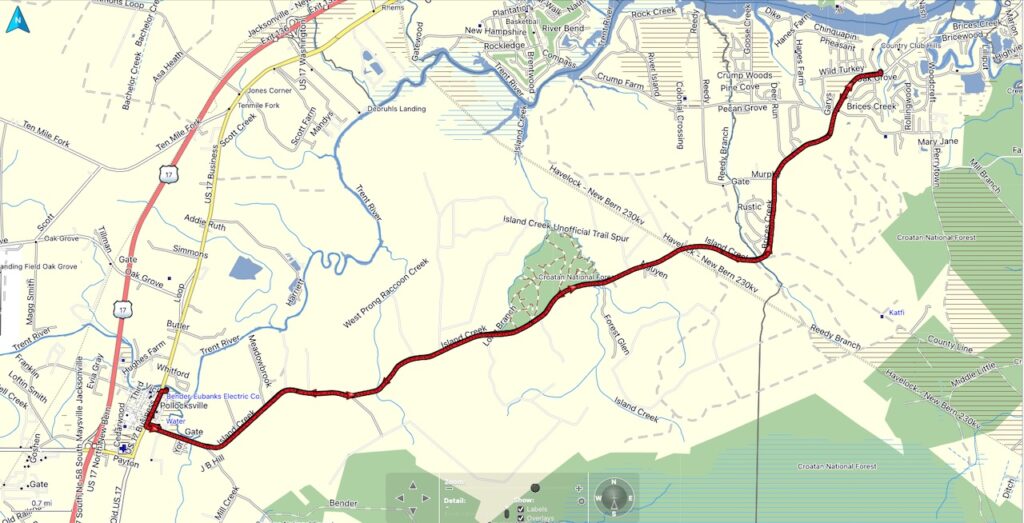
No Wifi, No Bluetooth but you can hook your Edge 705 up via USB and view your track in Garmin Basecamp. Doesn’t matter what map you have loaded on your computer, it will display the track across them. Depicted in red below is the 22 mile bike ride I took today (May 14, 2026) on OpenStreetMap.
Privacy
My Garmin Edge 530 uploads my ride immediately upon saving when I get home to Garmin Connect. Every bit of data it records goes right to the internet under my profile. I also wear an Apple watch when I ride and use Strava to capture that data. Every once in a while it tells me, by name, who is the “Local Legend” on certain routes. I presume that when I’m the local legend it tells others my profile name.
My cousin also follows my Strava profile and sends me likes which is cool and super supportive. But someone could pull this data to develop a snapshot of the best time to find my home unoccupied.
With the Edge 705 the data is on the device and transfers to a computer and I have control of where that data goes. This goes a long way regarding data protection. I’m not recommending one method over the other but merely pointing out the potential dangers of oversharing personal information.
If you don’t believe me then google “Strava Stalking”.
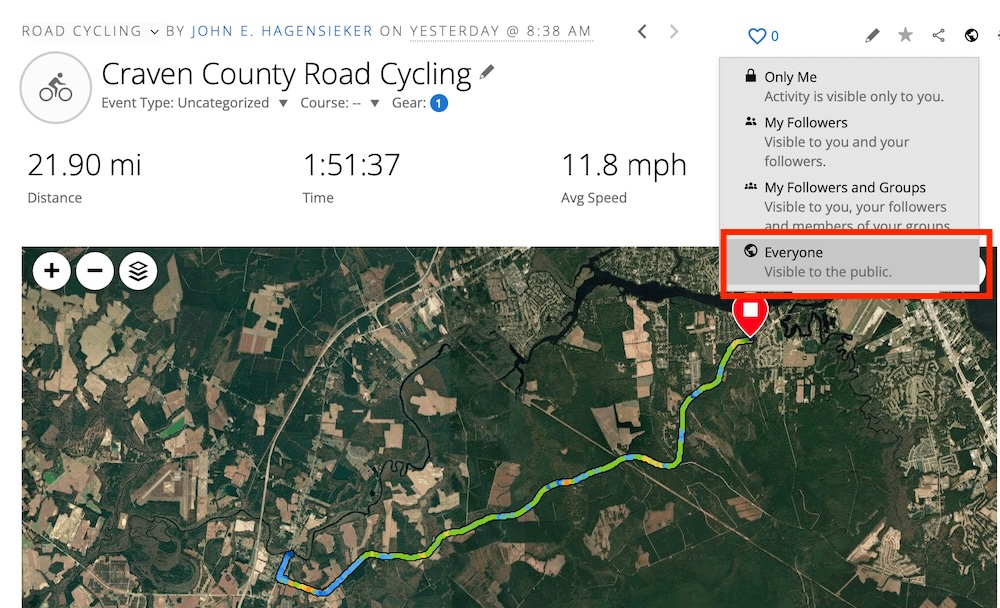
Ditto for Garmin Connect. My ride is visible to “Everyone”.
Garmin, Garmin, Garmin
I know that the Edge 705 is no longer supported, however it stands to reason that if your Garmin Express program points me to your map update for the Edge 705 that it OUGHT TO WORK. Especially since other map sources work perfectly.
Wrap Up
I realize this isn’t a proper review of the Garmin Edge 705 but merely me rediscovering the device and discussing the issues I found with their own mapping software. Still, add a new battery, upload an open source map which is better than the commercially sold map product and you have an excellent bike computer even almost 20 years later.
There isn’t WiFi, nor is there Bluetooth but you can still sync your activities via USB. That seems like ancient technology these days but while I love smart devices……..not every device NEEDS to be smart. This is a perfect example of that.
It isn’t often that a nearly 20 year old device performs on par with current technology. The Garmin Edge 705 does just that.