
Casio GG-1000 – Calibrate Watch Hands After Battery Change

I own a Casio G-Shock GG-1000 Mudmaster and dug it out yesterday only to find out the battery was dead. I just so happened to have a couple of 395 batteries and opened up the case to change them.
That went well and I put the Mudmaster back together. When I went to set the time that also went well, however, the procedure is to set the time digitally and when you are done the analog hands move into place to reflect the right time.
If they don’t then you need to calibrate the watch hands by using something called H-Set.
That will put the second hand, the hour hand, and the minute hand pointing straight up to 12 o’clock.
Only mine didn’t do that. The hour hand on mine went to 6 o’clock while the other two hands did what they were supposed to do.
Read The Manual (They Always Say)
I wish during this process I would have taken a picture of the internals but I didn’t. The operation manual says this about the Hand Home Adjustment procedure:
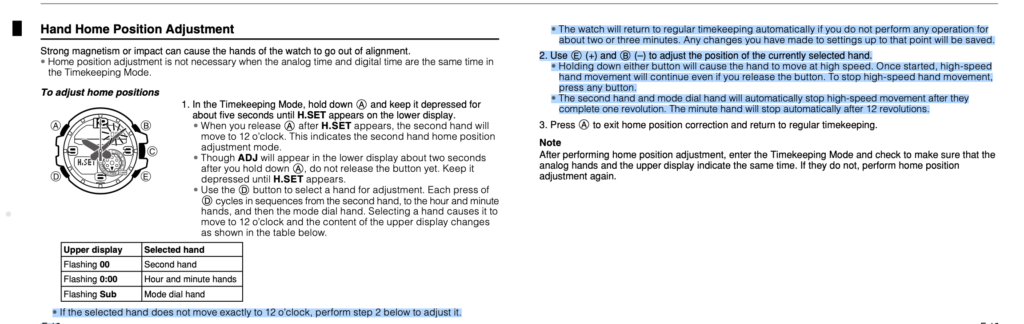
You’re not necessarily meant to read that. My point here is that the fix IS NOT IN THE OPERATION MANUAL.
The Actual Fix
First of all I stole this photo from a watch forum since I neglected to take a photo while mine was open. I added the markup to the screenshot though.
The photo is of the 5476 movement. The fix is simply to take a pair of tweezers or similar and short the test point labelled AC to the back of one of the batteries. This resets the watch.
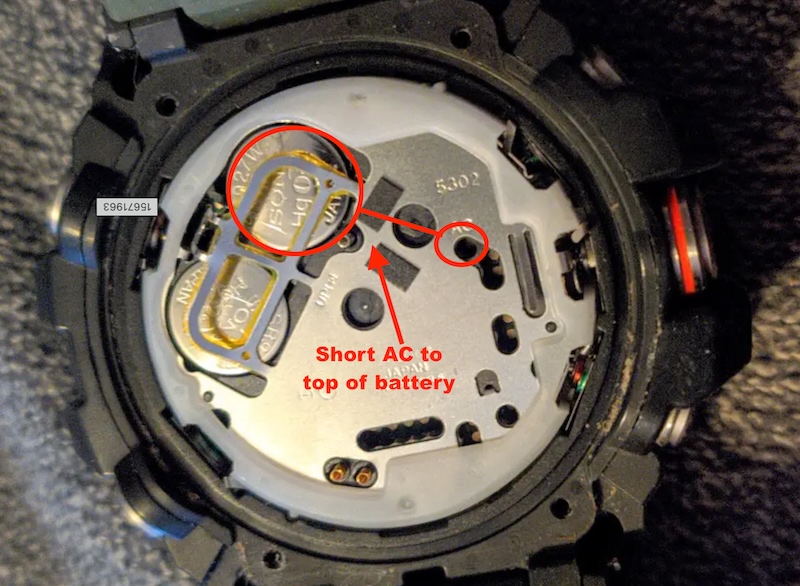
Now you can put the watch back together and perform the H-Set procedure. Once all the hands are pointing to the 12 o’clock position then you can set the time.
Hope this helps someone out there in Mudmaster land.