
Xiegu G90: Your Ultimate Portable Radio Solution
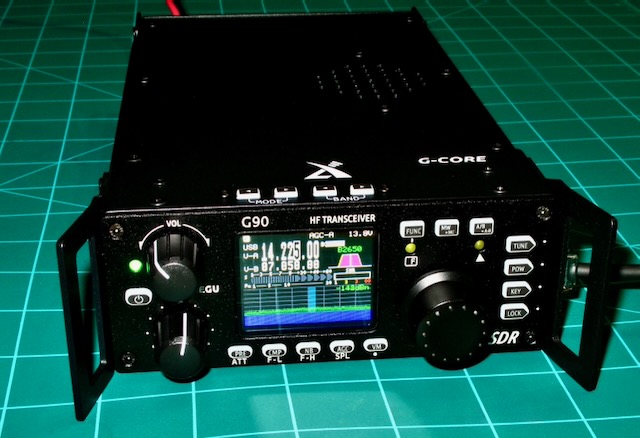
Sometimes I’m a bit late to the game with great Ham Radio Tech. This blog is no exception. The Xiegu G90 was initially released in late 2019 and I have only recently gotten my hands on one. I initially stumbled upon this after deciding that I wanted a good portable ham radio setup. The common term for this is POTA, or Parks On The Air. Another variation of that is SOTA, or Summits On The Air. Mountain climbing stuff.
The name Xiegu G90 just about always pops up when searching for POTA radios. One thing that needs to be discussed is that since the production run has been so long there have been improvements made in the G90 line. And you need to be aware of at least one of those improvements before you start buying accessories.
Input Power Connector
Early models of the G90 had a 2 pin Molex type connector commonly referred to as a Mini Tamiya connector.
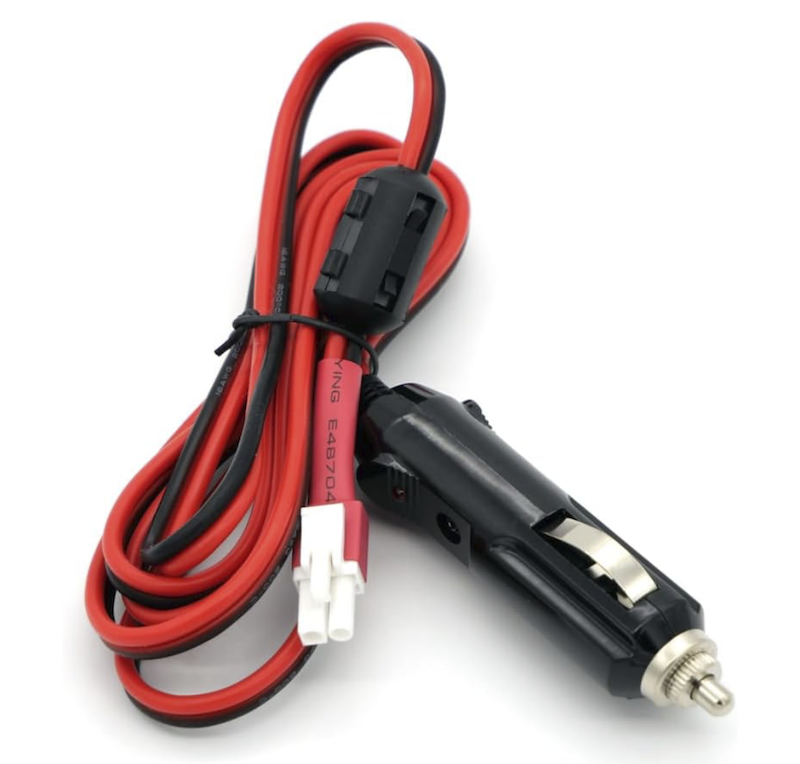
The connector looks similar to a JST connector but it is not a JST.
When i bought the Xiegu G90 I ordered a few cables in anticipation of my shack installation and an automotive installation and finally a POTA set up. What I did not know at the time is that newer versions of the G90 have Anderson PowerPole connectors instead of the Mini Tamiya connectors.
PowerPole
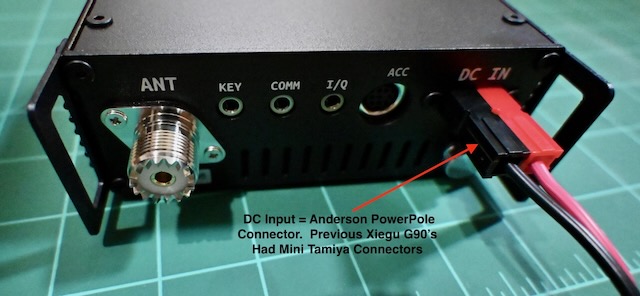
So my point here is that if you buy a G90 used, or get old stock, or get something right out of the factory you need to know which input connector it has.
While it seems like a dumb move for me to have bought 3 semi expensive cables the reality is that I have Anderson PowerPole connector kits (30 Amp) and crimpers here at the house. Rather than send them back, I will just snip off the old connectors and crimp on my PowerPole connections. Then I’ll slap some heat shrink over them.
To me it is far easier to do rather than send them back and wait for new ones when I have the tools, the parts, and the skills to solve this problem post haste.
More For The New Owner To Know About
The best support documentation is found at the Radioddity G90 page. Go to this page and read up on the G90. Also at the bottom of that page is a fairly long list of accessories you can get for the G90. One such accessory is a 100 watt amplifier.
Go to this page for software, firmware, and manual downloads. The manual section includes directions for CAT control (Computer Aided Transceiver). Hey, the Xiegu G90 has a small screen. Hooking it to your big computer monitor or laptop screen lets you see things a lot more clearly.
FCCID Information
There are two FCCID numbers. Check to make sure which one applies to your radio by checking the chassis data plate.
- 2ANLH-G90 – Typically this is for the version with Mini Tamiya Input connector
- 2BGMW-G90 – Typically this for the version with Anderson PowerPole input connector
FCCID information is the very best source or technical data and testing that you can get. Test data and photographs are just a couple of the things that are usually included.
What Makes The Xiegu G90 Stand Out?
- Price – At less than $500 the G90 is a full featured radio
- Up to 20 watts output power
- Receives from 0.5 MHz to 30 MHz
- Transmit range is 1.8 MHz to 29.7 MHz
- MARS Mod extends transmit range from 0.5 MHz to 30 MHz – includes CB radio and Military Auxiliary Radio System and Civil Air Patrol
- MARS Mod involves lifting one leg of a surface mount diode
- Detachable Head Unit (extension cable provided)
- 24 bit Software Defined Radio (SDR) Architecture
- Built In Automatic Antenna Tuner
- Built In SWR Analyzer
- Inclued FTDI cable allows you to connect to a computer and functions as a panadapter with free software
- Lots of accessories
Regarding the accessories, If you buy a G90 ($429 currently) and a 100 watt amplifier ($558 currently) you’re pushing into a higher price point that a radio like the ICOM IC-7300 might fill better. Or you can be a clown like me and own all of it.
Those are some of the key features. Regarding the MARS Modification. Once performed you immediately void your warranty. Also transmitting on some areas of the extended coverage can get you in trouble.
POTA Setup
Power Source
I intend to use a Jackery 1000 version 1. Can’t get the v1 anymore but they have a V2. One thing I love about the old model is that it has a PowerPole connector for input power which aligns nicely with some solar panels I have. POTA generally = austere. While you can power your G90 from the cigarette lighter it is far better to feed your radio 13.8v instead of 12v to ensure maximum power output.
Power Supply
Because of its small size it makes it an excellent choice for POTA or Field Day operations. I plan on powering mine from a Jackery 1000. I can power it from the 12 vdc cigarette lighter (which could chop my output power a hair) or via a small AC driven 13.8 vdc power supply.
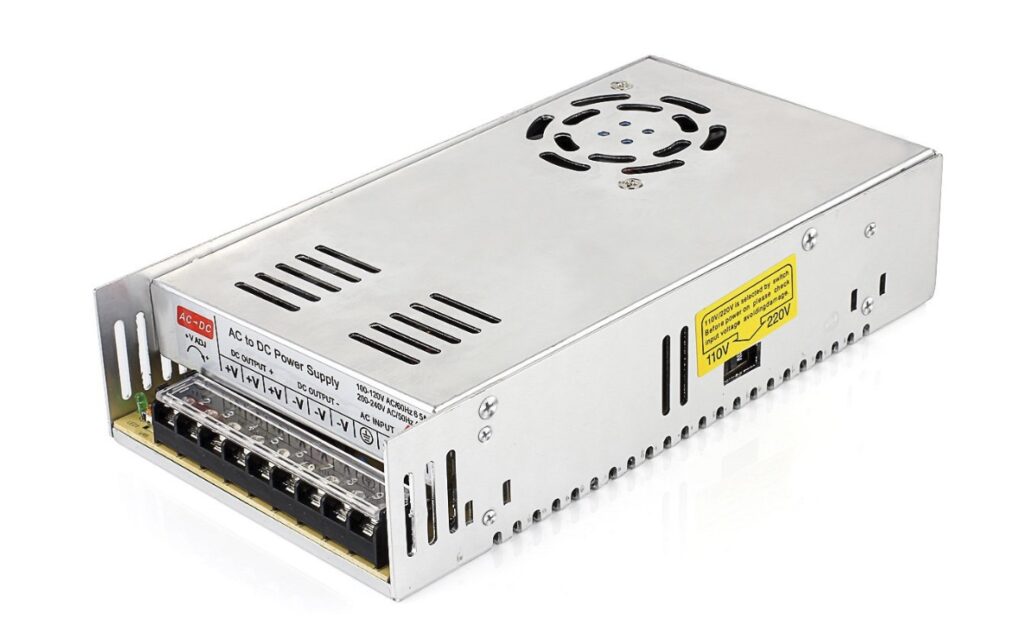
Is this the best ham radio power supply? NOPE. Not by a long shot. But what it is, it is adequate, lightweight, and inexpensive. Also look for local classifieds for more proper power supplies. I found an Astron SS-25M Power Supply for less than $50 on Facebook Marketplace once. It needed a couple of parts that cost me a whopping $10 or so to make it like new again. It needed a new output connector and the bulb in the power switch was dead. Easy fixes.
It would also make a nice POTA power supply.
Laptop
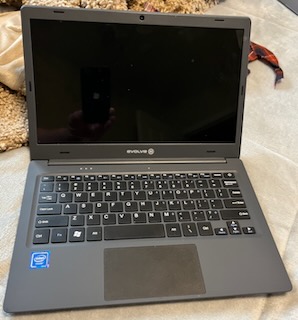
MicroCenter sold Maestro Evolve III laptops for $75. They were cheap classroom computers.
And while they are veritable dogs in the speed department they run most Ham Radio Software just fine. Also, Ham Radio operators love them because the input power is 12v.
Most laptops run around 19.0v – 19.5v. Plus there is a big heavy power brick involved. The Evolve III brick is tiny comparatively.
I reviewed the Evolve III laptop here.
Antenna
So many choices. I settled on the Yaesu ATAS-25. You probably have your favorite and I’d love to hear what you use for POTA.
Back To The Xiegu G90
MARS Mod
The MARS mod for the G90 is simple to achieve. Look to the right of the big ARM chip near the bottom. See the white arrow pointing to the diode? You simply lift one leg of that diode (or remove it completely) and that is it.
I’m told that on the never G90 variants from 2025 on that the white arrow may be missing, however, the hardware is exactly the same and you lift a leg of the exact diode. I cannot confirm this because I haven’t opened my radio yet. The pic below was copied from the FCCID report.
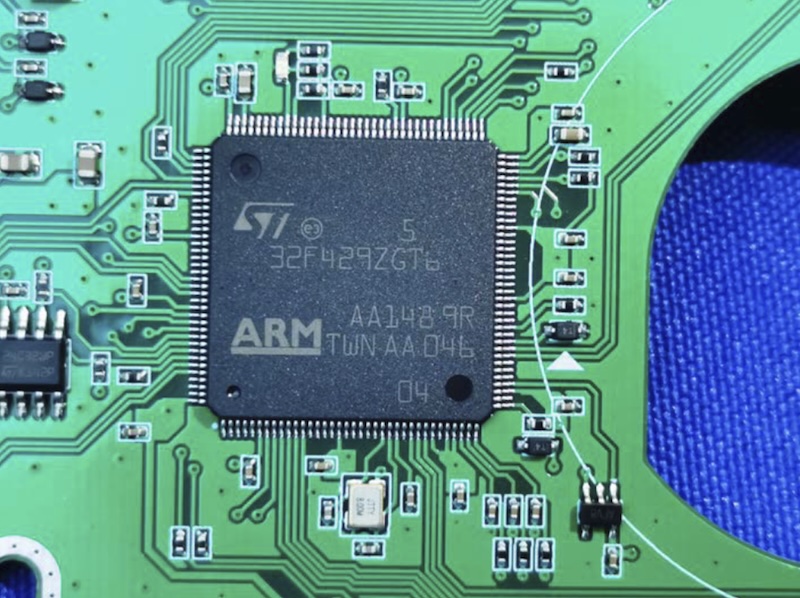
Even though I love to tinker and mod, I’m not sure I’m going to perform this MARS Mod. If you open up CB radio I believe the output power is chopped and the filters aren’t really set up for those frequencies on the radio. Still it is fun to do probably and gives me more things to write about.
Automatic Antenna Tuner
Here is something you need to know. I mentioned above that I have a Yaesu ATAS-25 antenna. The ATAS-25 is a MANUALLY tuned antenna. I tuned my antenna to the 20 meter band. Then I connected the G90 and got like a 1.1 something SWR. I hit the Auto Tuner with no real improvements which was to be expected because I nailed the manual tuning.
Then I flipped the radio to 40 meters and did an auto tune. The SWR was off the charts and did not improve after the auto tuning operation.
So I guess what I’m saying is that you need a more general coverage antenna without manual SWR tuning to get the full effect of the auto tuning of the G90.
Panadapter
It is a breeze to hook the FTDI to your computer and be sure to select the correct serial port and port speed of 19200. You also need an audio connection. I won’t confuse you by telling you how I got it kinda, sorta working okay with an $8 USB sound card that has a proper Line In. Most folks buy a DigiRIGMOBILE kit that has the sound card and all the correct cables you nee. I got mine here.
I’ll add more info on this later.
Panadapter Software
All free. On Windows you download OmniRig and an SDR software such as HDSDR. You can use other SDR software but the consensus seems to lean towards HDSDR. And in my case for sure with a laptop with a 1.1GHz Celeron processor HDSDR is light and efficient. It is a good fit.
Wish List
This is small potatoes but I wish the radio had an SD card and could capture screenshots. Additionally, the screen isn’t as crisp as I wish it was. I’d grade it adequate+.
Wrap Up
For the money the Xiegu G90 is tough to beat. It won’t replace my ICOM IC-7300 which is also an excellent choice for POTA. I personally don’t want to drag my IC-7300 out in field conditions. It stays in the shack. The G90 is small and light and only needs a couple of connections.
The G90 is an SDR, and it is easily hooked to a laptop or computer and function as a panadapter.
As a ham radio hardware and tech fan I personally love this little radio and wish I’d have bought one years ago. That being said I love that I got the 2025 version with the PowerPole connectors.
If you have a little money to spare and ham radio is your thing, get the Xiegu G90.